
Pick one review period, compare the same measures for each carrier, then pull the repair files behind the largest difference. Approval rate helps the estimating team decide which files to review. Days to pay helps the office decide which balances to follow up.
Agree on the comparison
Choose a period such as the last 90 days and record its dates. Use the same report definitions across carriers. An approval rate counts supplement decisions under the report’s rules. Delivered-vehicle volume is separate. Days to pay in the example is measured from delivery. Changing those definitions between carriers will change the comparison.
Read the numbers together
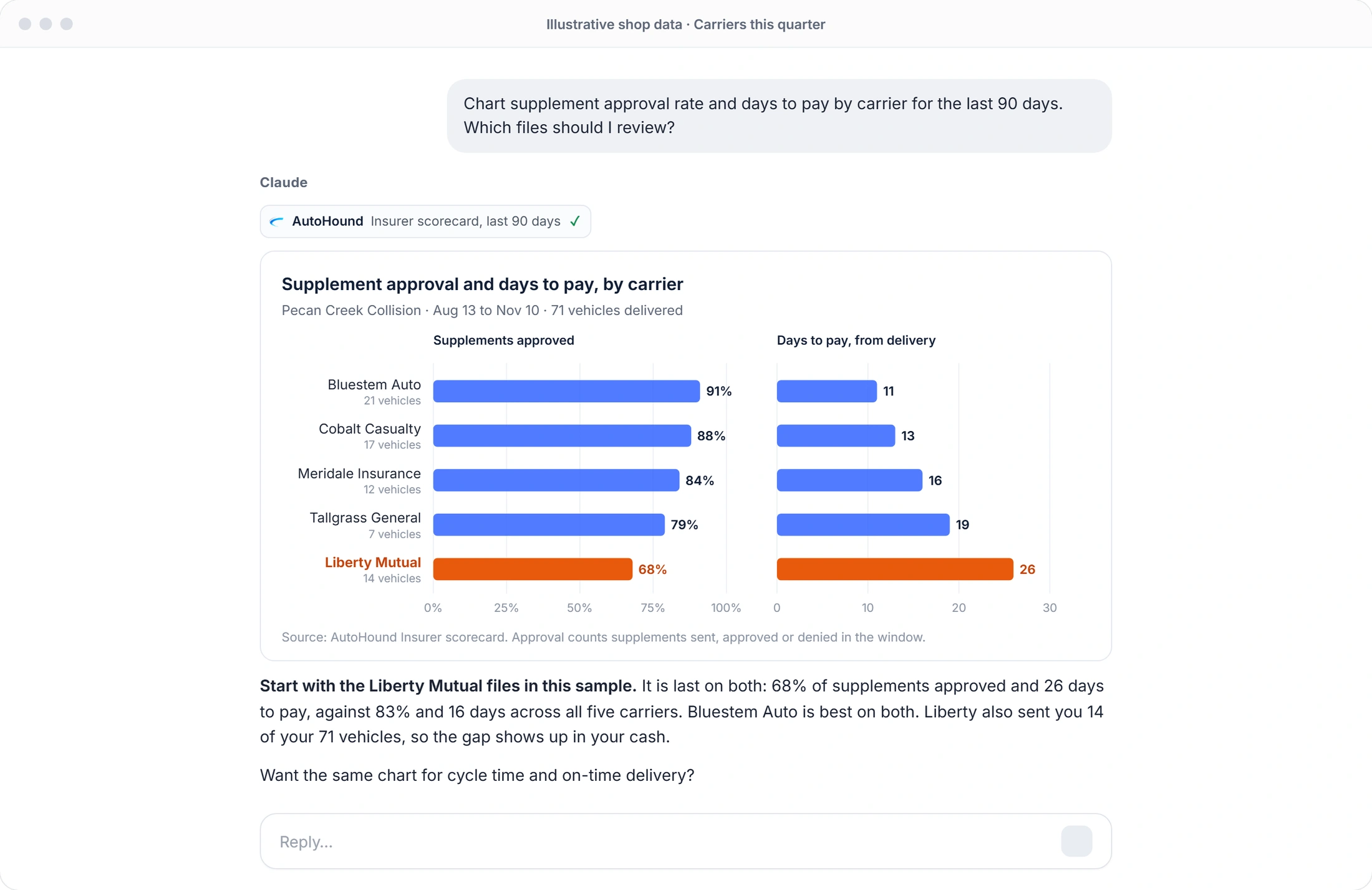
In the illustrative chart, Liberty Mutual shows 68% supplement approval and 26 days to pay, while Bluestem shows 91% and 11 days. Liberty Mutual had 14 delivered vehicles and Bluestem had 21. The gap is a reason to open files. Look for an unanswered request, an approval awaiting payment or a remittance still to reconcile. Check the number of decisions behind each percentage before drawing conclusions.
Bring one question to the carrier
Select two or three ROs with documented dates. A question such as “We sent the requested evidence on October 12. Is anything else needed for a decision on this supplement?” gives the reviewer something specific to answer. Use the carrier comparison for context and each file’s own history for follow-up.
Repeat the review next period
Save the period, the measures and the files selected. At the next review, use the same definitions and check what happened to the open items. A connected user with access to the insurer scorecard can ask Claude or ChatGPT to draw the comparison, then verify each figure against the report before sharing it.
Carrier review sheet
Use one sheet per carrier review.
- Date range and carrier
- Approval rate and decision count
- Days to pay and delivered volume
- ROs to review and supporting dates
- Question, follow-up owner and next review