Open the job without retyping
Painters choose the repair from the PPG production screen they already use. The VIN, plate, year, make, model, and OEM paint code are already attached.

Two-way paint system connection
AutoHound sends active refinish work, vehicle details, paint codes, and updated hours to the PPG screen your painters already use. Finalized mix usage and actual materials cost return to each RO, so you can see what every paint job made.
No double entry
Jobs with refinish hours appear automatically. Estimate and supplement changes keep the PPG screen current.
Painters choose the repair from the PPG production screen they already use. The VIN, plate, year, make, model, and OEM paint code are already attached.
When a supplement changes the estimate, the updated refinish hours flow through without anyone entering them again.
After delivery is recorded in AutoHound, the job closes on the PPG screen. The painter's list stays focused on active work.
Relevant jobs only
Refinish hours count every estimate version, including hand-typed supplements. Rates and materials figures come from imported estimates. Jobs without refinish hours stay off the paint screen.
Keep the PPG workflow
Painters keep using PaintManager or PPG LINQ on the computer already attached to your paint system. AutoHound sends active jobs and updated refinish hours, and PPG sends mix usage and materials cost back to the RO.
The jobs are already filled into the familiar PPG production screen.
A small connector runs on the computer already attached to the shop's paint system.
Connect PPG PaintManager or the newer PPG LINQ platform.
PPG sends mix data back
PPG returns mix usage and actual cost to AutoHound, where the numbers sit beside materials revenue on the RO. Actual cost typically arrives within an hour of the last spray.
Compare what the repair consumed with the materials amount on the RO.
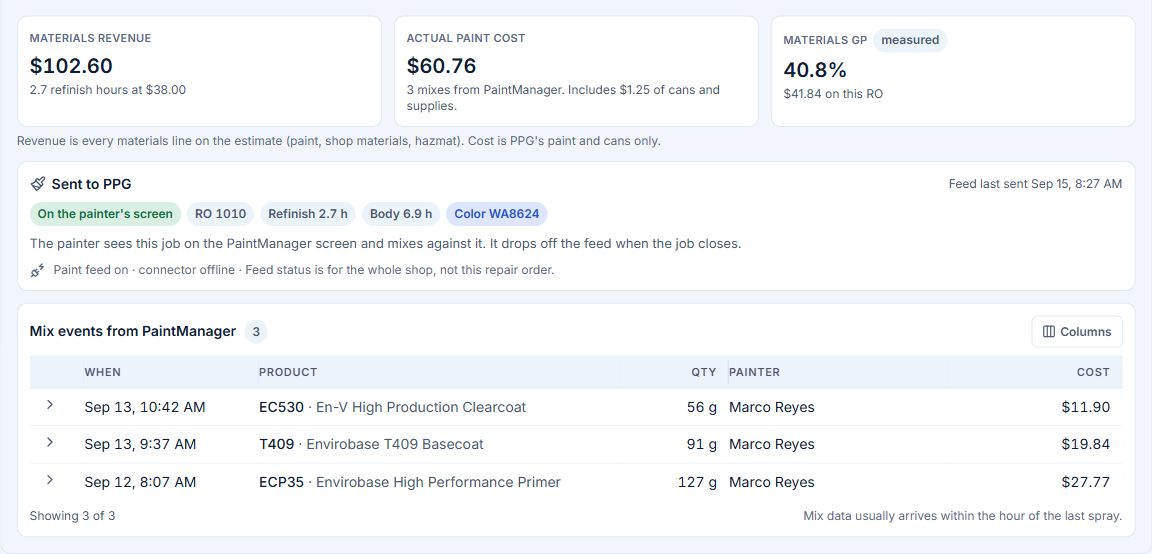 RO-level paint usage and materials margin · View full size
Review materials gross profit by job, insurer, or estimator.
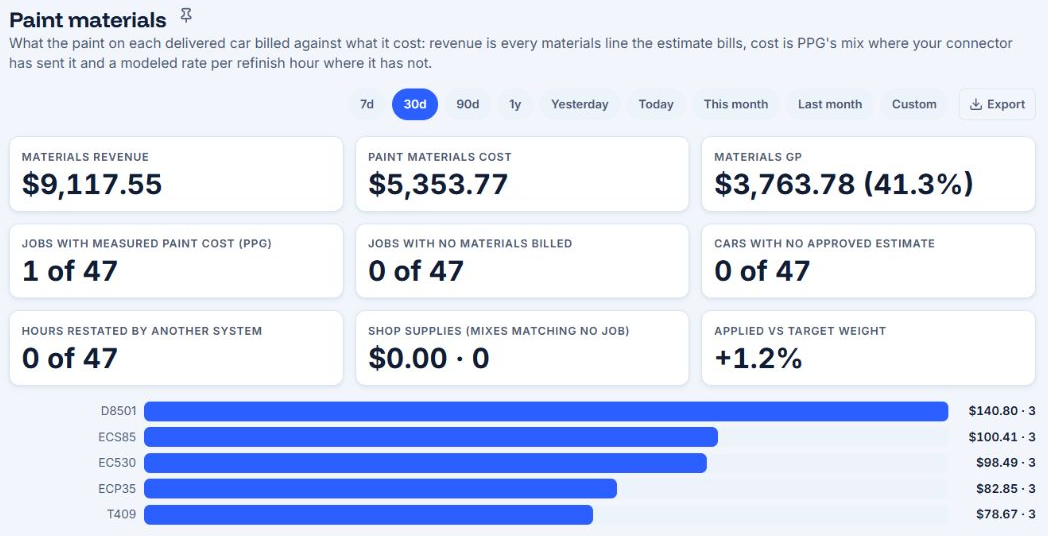 Shop-wide materials performance · View full size
How the connection works
AutoHound sends repair data through PPG's published Paint Shop Interface. PPG returns mix data to the matching RO.
Connect the paint booth
Connect PPG PaintManager or PPG LINQ to the same repair record the whole shop uses.