
For a collision-led shop, choose software built around collision work. AutoHound connects supported estimate imports, supplement approvals, production stages, parts, conversations, and separate customer and insurer balances on one repair order. You keep your estimating system and give the whole team a clear place to run everything that follows.
An estimate is only the start
A collision repair rarely ends with the scope first written. Teardown reveals more damage. A supplement changes the approved work. A part arrives late, a sublet needs a report, and the customer wants a new delivery date. The office still has to collect the customer share and the insurer balance.
AutoHound keeps that changing job connected. The estimator, advisor, parts person, and technician have different tasks, but the repair order holds their shared history. The next handoff can start with the record instead of another round of status questions.
Choose the terms, too
The workflow matters. So does the way your software company does business. AutoHound makes its price, included features, subscription terms, and data commitments available before you decide.
- Every product feature included. The shop subscription has no feature tiers to unlock.
- Unlimited users. Give each staff member their own access without adding a per-user AutoHound charge.
- Month-to-month. No long-term software contract. Stay because AutoHound works for your shop.
- Your shop data stays yours. We never sell your shop data or share it for third-party advertising. Use the built-in export tools while your account is active. Read our data commitments.
- Public pricing. No sales call required. The shop plan is $599 per location per month. Read the price and start a private demo on your own schedule. Prefer a conversation or guided walkthrough? We are always happy to talk with shops.
No setup fee, with four onboarding consultation hours included. Your estimating subscription remains separate, and a requested custom historical migration is scoped and quoted separately.
Buy for the repair you manage
Swipe or scroll the table to compare all columns.
| Your day | What can get lost | How AutoHound helps |
|---|---|---|
| More damage after teardown | Which version is approved and what still needs an answer. | Keep estimate versions, approvals, evidence, and supplement follow-up on the RO. |
| A repair cannot move | The missing part, blocker, next owner, or revised promise. | See production stages, assignments, parts signals, and blockers together. |
| The insurer owes more | An unpaid supplement or materials invoice behind a delivered job. | Keep customer and insurer responsibilities distinct and follow the balance. |
| A handoff reaches the floor | The task buried in someone else's conversation. | Give staff My Work queues, team messages, and the repair context on a phone or tablet. |
Look past the shop-software label
Mechanical-service platforms commonly emphasize inspections, recommended services, labor lookups, and repeat maintenance. Collision work puts more weight on changing damage estimates, insurer approvals, production dependencies, and split payer responsibilities. Those are different starting points, even when both products advertise estimates, scheduling, and payments.
There is overlap: Shopmonkey explicitly serves body shops, while CCC Repair Workflow and Mitchell RepairCenter are collision-management products. That does not make every workflow interchangeable. AutoHound's case is specific: supported collision estimates feed a repair record that carries the work through the shop and into collection.
Fleet and heavy-duty collision repairs belong in that picture too. AutoHound connects fleet units and account billing and larger-unit collision work without redefining the job as preventive maintenance.
Keep the estimator. Improve the shop
You do not need to replace CCC ONE, Mitchell, Audatex, or AdjustRite to change how the rest of the repair runs. AutoHound's Windows connector picks up supported estimate and supplement files, keeping the source and versions with the RO.
Your estimators keep writing in their supported system. The rest of the team gets the production, parts, messaging, and payment workflow around that estimate. AutoHound does not replace the estimating database or license. See the estimate-import workflow.
One repair. Two responsibilities.
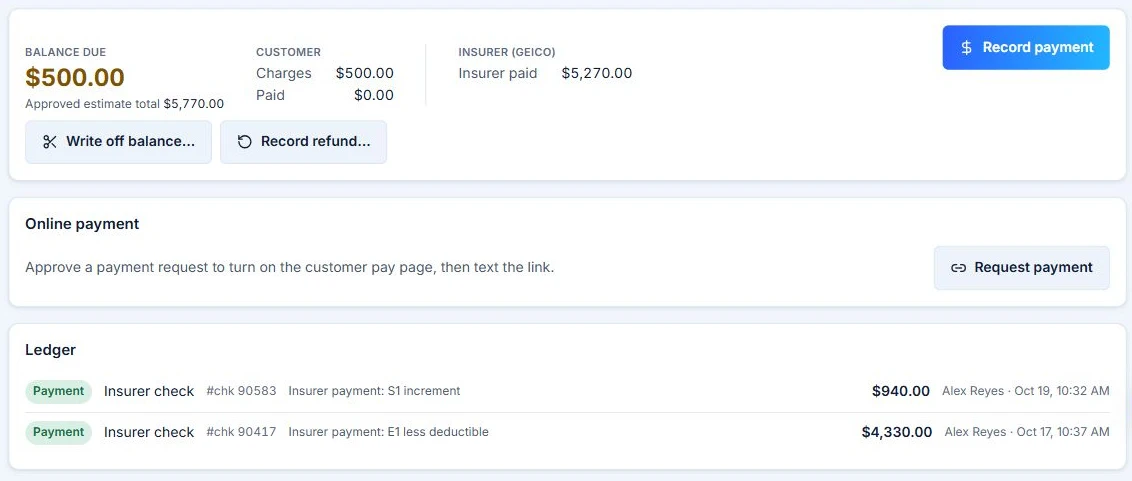
Illustrative workflow with sample shop data, not customer results.
Look at the sample payment record below. The insurer has paid $5,270, but the customer still owes $500. Calling the repair simply “paid” would hide the next collection step. AutoHound keeps the two responsibilities visible on the job.
The estimator can retain the approved scope, the office can identify the remaining payer, and the payment history stays with the repair. That is the kind of detail that makes a collision workflow useful after the vehicle is repaired, not just when the estimate is written.
Keep the money in the workflow. Follow vendor credits, unpaid insurer balances, and optional materials invoices. For a total loss, keep storage, teardown, towing, and other billable fees with the file. AutoHound helps document the amount and the next follow-up; it does not guarantee payment. See total-loss fee tracking.
Start with a workable plan
You can choose a collision workflow without making every tool in the shop part of the change.
- Keep the right connections. Confirm your supported estimator, QBO setup, and any required interfaces.
- Prepare active work. Identify open repairs, orders, balances, and documents. Agree who brings them forward and checks the totals; scope historical migration separately.
- Set up the essentials. Use the guided checklist for shop details, roles, stages, templates, the estimating connection, and capacity.
- Rehearse a handoff. Have the advisor, parts person, technician, and bookkeeper follow one repair before your chosen cutover.
Four onboarding consultation hours are included. AutoHound's team brings experience in collision repair, automotive refinish, and OEM software. See the switching plan or meet the people behind AutoHound.
Choose a collision-first workflow
Choose AutoHound when changing scope, production handoffs, and insurer-funded repairs shape your day. Keep your supported estimator, give the team one repair record, and follow the money after delivery. The public monthly plan and your control of shop data make that choice straightforward.
Open your private 7-day demo shop and explore realistic repairs without a credit card or a sales call. When you are ready to start your own shop, the 30-day live trial starts at $0 with a payment method required.
Take this to the demo
Put AutoHound to work
Explore a private sample shop and follow the estimate, the parts, the handoff, and the balance. No credit card or sales call required.
Try the 7-day demoPrefer a written checklist? Open the printable workflow scorecard.
See it in AutoHound
- Bring in a supported collision estimate and find its source on the RO.
- Follow a later supplement without losing the earlier version.
- Find a parts blocker and the next assigned staff member.
- Open the same repair context from the office and My Work.
- Keep the insurer balance distinct from the customer share.
- Explore the handoff from recorded payments into QuickBooks Online.
Sources and product details
Published by AutoHound. Supporting documentation reviewed October 20, 2026; core competitor product pages rechecked October 31, 2026. This is our product comparison, not an independent ranking or a hands-on review of every system. AutoHound pricing and data commitments checked October 31, 2026. Product scope can change; undocumented capabilities are not treated as absent.
- Shopmonkey body-shop softwareOfficial body-shop positioning; category overlap is intentional.
- Tekmetric product overviewOfficial auto repair software positioning and product areas.
- CCC Repair WorkflowEstimating-connected collision management.
- Mitchell RepairCenterThe collision-management product, not Mitchell 1 Manager SE.
- Fullbay internal fleet shopsFleet maintenance and asset-management evaluation context.
- AutoHound estimating connectionsSupported estimate and supplement import boundaries.
- AutoHound public pricing and included featuresPublic monthly price, unlimited users, included features, trial and onboarding.
- AutoHound shop data commitmentsMonth-to-month terms, shop data ownership, built-in exports and no sale of shop data.
- AutoHound Privacy PolicyNo sale or advertising sharing; necessary service providers and shop-directed integrations remain distinct.
- AutoHound guided setup and switchingWhat stays, what active work is prepared, guided essentials and included consultation hours.
- The AutoHound teamPublished team experience and direct contact with the people building AutoHound.
Product names belong to their respective owners. This comparison does not imply affiliation or endorsement.