
AutoHound is our recommendation for collision-led shops that want connected operations around a supported estimating system and QuickBooks Online. Its $599 per-location monthly plan includes unlimited users and every product feature. The alternatives below show the different categories you will encounter, but the case for AutoHound is the work your team can run together today.
Start with your shop type
Searching for shop software puts collision management beside mechanical service, fleet maintenance, dealer systems, and specialist communication tools. Shared feature labels can hide very different operating workflows.
If collision repair is your business, start with changing scope, insurer approvals, production handoffs, parts dependencies, and collection. Those are the connected tasks AutoHound is built to carry. The category guide explains the distinction in more detail.
Why choose AutoHound?
AutoHound brings the office, parts desk, floor, and bookkeeper into one connected collision workflow. Keep CCC ONE, Mitchell, Audatex, or AdjustRite for estimating. Supported estimates and supplements feed the RO through a Windows connector.
- Carry the plan to the floor. Production stages, My Work queues, parts signals, blockers, and required checks keep the next move visible.
- Keep the team connected. Customer updates, internal chat, vendor texts, and secure portals keep conversations close to the repair.
- Follow the balance. Separate customer and insurer responsibilities and use optional Materials to invoice and pursue the uncovered allowance.
- Keep your books. Sync customers, invoices, and recorded payments to QuickBooks Online.
- Support commercial work and growth. Fleet units, heavy-duty repairs, and MSO oversight extend the same collision focus.
Know the price. Keep control.
A software shortlist should compare the business relationship as well as the feature list. With AutoHound, you can see the price, know what is included, and try the product without booking a sales call.
- Every product feature included. The shop subscription has no feature tiers to unlock.
- Unlimited users. Give each staff member their own access without adding a per-user AutoHound charge.
- Month-to-month. No long-term software contract. Stay because AutoHound works for your shop.
- Your shop data stays yours. We never sell your shop data or share it for third-party advertising. Use the built-in export tools while your account is active. Read our data commitments.
- Public pricing. No sales call required. The shop plan is $599 per location per month. Read the price and start a private demo on your own schedule. Prefer a conversation or guided walkthrough? We are always happy to talk with shops.
No setup fee, with four onboarding consultation hours included. Your estimating subscription remains separate, and a requested custom historical migration is scoped and quoted separately.
Turn a blocker into a next step
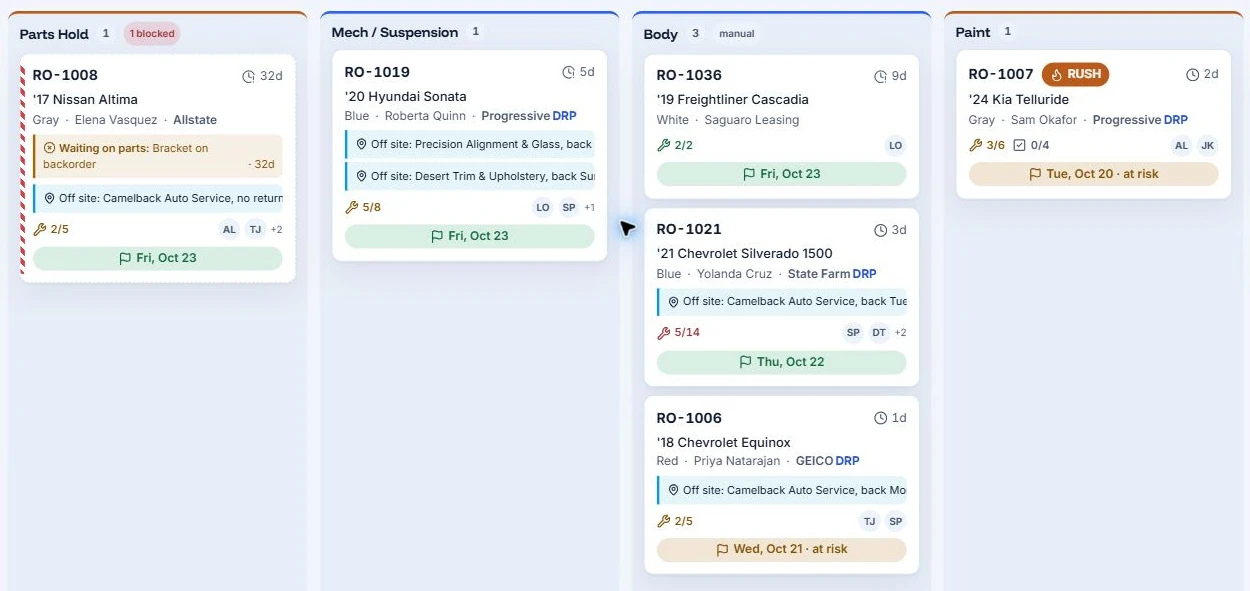
Illustrative workflow with sample shop data, not customer results.
In the sample board below, RO-1008 is waiting on a backordered bracket. RO-1007 is rush work in Paint with a promise at risk. Those are different decisions for the huddle, and the information belongs to the repairs.
In AutoHound, the production manager can find the blocker, the parts person can follow the order, and the assigned staff can open their work. The point of comparing software is to get a day like this under control. AutoHound connects the visible issue to the people and records needed to act.
Keep the money in the workflow. Follow vendor credits, unpaid insurer balances, and optional materials invoices. For a total loss, keep storage, teardown, towing, and other billable fees with the file. AutoHound helps document the amount and the next follow-up; it does not guarantee payment. See total-loss fee tracking.
Collision management
These products address collision management. AutoHound is shown first because this is our guide and our recommendation for the connected workflow described above. The other rows explain the approaches you may encounter; they are not an independent ranking.
Swipe or scroll the table to compare all columns.
| Product | Documented focus | What to test |
|---|---|---|
| AutoHound | Connected repair workflow around supported external estimates, with production, parts, communication, payments and reports. | Follow a supplement, a parts return and split payer balances into the QBO handoff. |
| CCC ONE Repair Workflow | Shop management connected to the CCC ONE environment, including production planning and reporting. | Confirm which workflow and accounting functions are in the proposed package. |
| Mitchell RepairCenter | Collision management with estimating-system conversion, parts, job costing and accounting interfaces. | Demonstrate your estimator and required modules together. |
| Nexsyis Collision | Collision management with integrated accounting, independent of the estimating system. | Decide whether to move accounting into the management platform. |
| ROME | Collision production, parts, labor and financial workflows, with accounting and dealer connections. | Trace the exact DMS or accounting interface your office needs. |
| SummitCRS | Collision-management system within a family of production, scheduling and media tools. | Separate the core system from the companion products in the quote. |
| Solera AutoFocus | Listed by Solera as body-shop management for inventory, parts ordering and scheduling. | Confirm current regional availability, exact product version and supported connections. |
Go deeper with the CCC, RepairCenter, Nexsyis and ROME comparisons. An Audatex estimating connection is not the same thing as buying Solera's management product.
Broader repair platforms
These names appear in auto-shop software searches. Their wider scope is useful context, but AutoHound starts with the collision repair rather than asking you to infer collision fit from generic estimates and payments.
Swipe or scroll the table to compare all columns.
| Product | Public product emphasis | Collision-shop demo question |
|---|---|---|
| Shopmonkey | Broad shop software that also explicitly markets to body shops. | How does a revised insurance estimate flow into an existing order? |
| Tekmetric | Auto repair management with digital inspections, estimates, operations and multi-shop tools. | Show supplement status and the separate amounts due from each payer. |
| Shop-Ware | Digital repair-order workflow, staff handoffs and customer communication. | How are extended parts or sublet waits tracked across production stages? |
| AutoLeap | Auto repair, tire and specialty-shop software with inspections, scheduling and accounting connections. | Demonstrate your insurer-funded repair, not only a customer-approved service. |
| Mitchell 1 Manager SE | Shop management for auto and light-duty service, with a separate truck edition. | Confirm which product is being quoted. Manager SE is not RepairCenter. |
See the detailed Shopmonkey and Tekmetric comparisons. An unverified feature is a question to resolve with the vendor, not a missing-feature verdict.
Commercial maintenance
Fullbay focuses on heavy-duty repair and includes fleet maintenance workflows. Distinguish ongoing maintenance from repairing collision damage to a commercial unit.
AutoHound keeps fleet unit identifiers, account details, approvals, and billing with the repair, with heavy-duty collision workflows for larger units. If damaged fleet vehicles and trucks are your work, start with that collision process.
Companion tools
BodyShop Booster emphasizes collision-shop lead capture, communication, follow-up, and booking. A specialist acquisition tool addresses a different buying question from a full shop-management workflow.
AutoHound connects booking and customer updates with production, parts, payments, and reporting. You can follow the work after the booking instead of treating acquisition and repair operations as the same product category.
Start with a workable plan
A shortlist becomes useful when you can picture the move. Start with the work and connections the shop needs on its first live day.
- Keep the right connections. Confirm your supported estimator, QBO setup, and any required interfaces.
- Prepare active work. Identify open repairs, orders, balances, and documents. Agree who brings them forward and checks the totals; scope historical migration separately.
- Set up the essentials. Use the guided checklist for shop details, roles, stages, templates, the estimating connection, and capacity.
- Rehearse a handoff. Have the advisor, parts person, technician, and bookkeeper follow one repair before your chosen cutover.
Four onboarding consultation hours are included. AutoHound's team brings experience in collision repair, automotive refinish, and OEM software. See the switching plan or meet the people behind AutoHound.
Start with AutoHound
Choose AutoHound for a collision-led shop that wants the estimator, office, floor, and accounting handoff connected. You can see the monthly price, include the whole team, and try the workflow before committing. Start with the repair you need to run, then see it in AutoHound.
Open your private 7-day demo shop and explore realistic repairs without a credit card or a sales call. When you are ready to start your own shop, the 30-day live trial starts at $0 with a payment method required.
Take this to the demo
Put AutoHound to work
Explore a private sample shop and follow the estimate, the parts, the handoff, and the balance. No credit card or sales call required.
Try the 7-day demoPrefer a written checklist? Open the printable workflow scorecard.
See it in AutoHound
- Open the connected repair order and follow its estimate history.
- Move from a production blocker to the part or approval behind it.
- Explore customer updates, team chat, and vendor messaging.
- Review separate payer balances and the reports behind them.
- Look at the fleet, heavy-duty, or MSO workflow relevant to your shop.
- Review the whole-shop plan and discuss your switching requirements.
Sources and product details
Published by AutoHound. Supporting documentation reviewed October 20, 2026; core competitor product pages rechecked October 31, 2026. This is our product comparison, not an independent ranking or a hands-on review of every system. AutoHound pricing and data commitments checked October 31, 2026. Product scope can change; undocumented capabilities are not treated as absent.
- AutoHound feature catalogCurrent collision workflow and newly released product areas.
- CCC Repair WorkflowCollision management within CCC ONE.
- Mitchell RepairCenterCollision-management package and module details.
- Nexsyis FAQEstimating and integrated-accounting boundaries.
- ROME softwareCollision workflow and accounting positioning.
- SummitCRS product familyCore management and separately named companion products.
- Solera vehicle claims and collision productsAutoFocus listing; regional availability should be confirmed.
- Shopmonkey body-shop softwareExplicit body-shop offering within a broader platform.
- TekmetricAuto repair product positioning.
- Shop-Ware digital workflowRepair-order visibility and staff handoffs.
- AutoLeapRepair, tire, specialty and multi-location focus.
- Mitchell 1 Manager SESeparate product from Mitchell RepairCenter.
- Fullbay productsHeavy-duty repair scope.
- Fullbay internal fleet shopsFleet asset and maintenance context.
- BodyShop BoosterLead, follow-up and booking emphasis.
- AutoHound public pricing and included featuresPublic monthly price, unlimited users, included features, trial and onboarding.
- AutoHound shop data commitmentsMonth-to-month terms, shop data ownership, built-in exports and no sale of shop data.
- AutoHound Privacy PolicyNo sale or advertising sharing; necessary service providers and shop-directed integrations remain distinct.
- AutoHound guided setup and switchingWhat stays, what active work is prepared, guided essentials and included consultation hours.
- The AutoHound teamPublished team experience and direct contact with the people building AutoHound.
Product names belong to their respective owners. This comparison does not imply affiliation or endorsement.