
Choose AutoHound if you want connected collision management while keeping QuickBooks Online. AutoHound sends customers, invoices, and recorded payments into your existing books. Nexsyis includes its own accounting and says it does not interface with outside accounting software. For a shop that wants to keep QBO, AutoHound is the straightforward choice between these approaches.
Keep the books you know
Your accounting records, routines, and bookkeeper's experience are valuable. AutoHound lets you improve shop management while keeping QuickBooks Online. Sync customers, invoices, and recorded payments on demand or on a schedule, with repeat runs remembering what posted.
Nexsyis's official FAQ describes an operations-and-accounting application that does not interface with outside accounting software. AutoHound takes a different approach: run the repair in AutoHound and keep the general ledger in QBO. If that is the boundary you want, it is a concrete reason to choose AutoHound.
Keep control of the relationship
Keeping QuickBooks is one choice. Clear software terms are another. AutoHound publishes the monthly price and its data commitments, so you can evaluate the workflow and the relationship before committing.
- Every product feature included. The shop subscription has no feature tiers to unlock.
- Unlimited users. Give each staff member their own access without adding a per-user AutoHound charge.
- Month-to-month. No long-term software contract. Stay because AutoHound works for your shop.
- Your shop data stays yours. We never sell your shop data or share it for third-party advertising. Use the built-in export tools while your account is active. Read our data commitments.
- Public pricing. No sales call required. The shop plan is $599 per location per month. Read the price and start a private demo on your own schedule. Prefer a conversation or guided walkthrough? We are always happy to talk with shops.
No setup fee, with four onboarding consultation hours included. Your estimating subscription remains separate, and a requested custom historical migration is scoped and quoted separately.
Keep the estimator, too
AutoHound's Windows connector picks up supported estimates and supplements from CCC ONE, Mitchell, Audatex, and AdjustRite. Keep the source files and earlier versions with the job, while your estimator continues in the supported estimating system.
Nexsyis also documents external-estimate imports. AutoHound's benefit is continuity on both sides of the change: keep your estimator, keep QBO, and improve how the repair moves between them.
Keep the bookkeeper in the loop
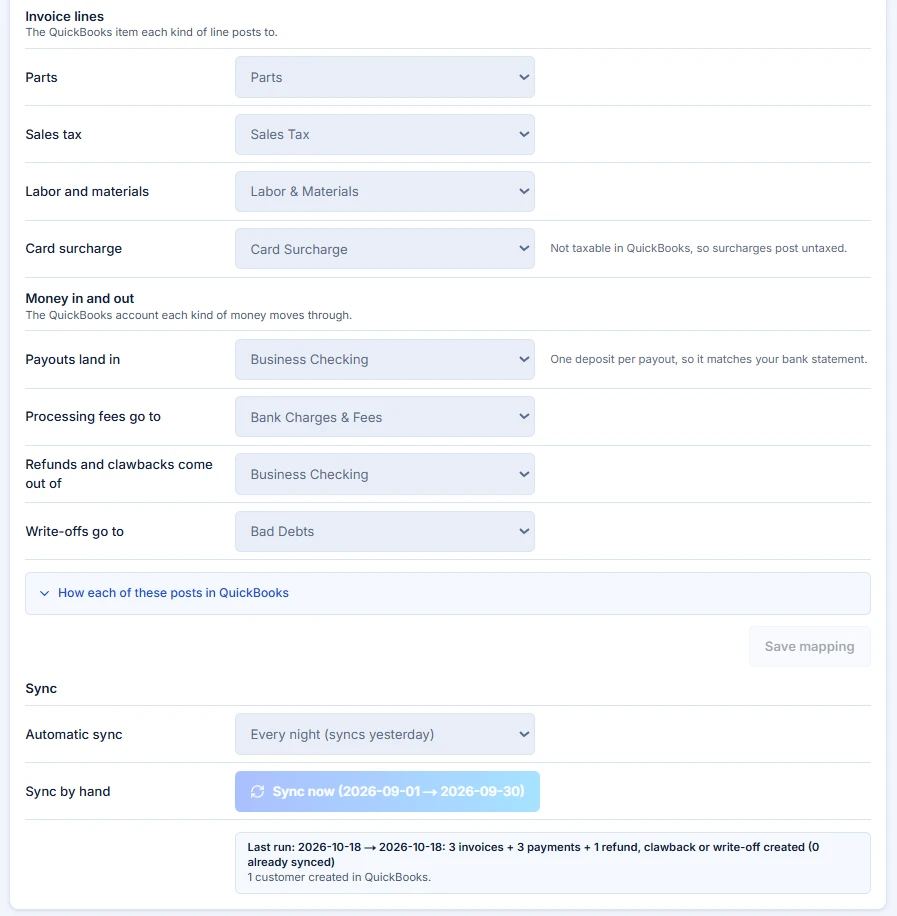
Illustrative workflow with sample shop data, not customer results.
A completed repair needs an accounting handoff your bookkeeper can follow. In the sample settings below, parts, tax, and labor/materials have mapped QuickBooks items. Money movements have their own accounts, and the sync has a schedule and last-run result.
AutoHound sends customers, invoices, and recorded payments on demand or on a schedule, remembering what posted. A changed materials invoice after posting is identified for the bookkeeper to correct. The repair stays in AutoHound while the accounting record goes to QBO. If QBO is the accounting home you want to keep, this is a concrete reason to choose AutoHound.
Put the next job in their hands
The production board keeps blockers, assignments, parts signals, and promised dates visible. My Work gives staff a focused queue on a phone or tablet. A technician can find assigned work and use the job timer while the office follows the same repair.
Nexsyis also offers browser-based mobile functions through NexsyisNow. AutoHound's case is the connected day your team can experience: start with the huddle, open the repair, find the missing part, and carry the next action to the person doing it.
Keep hours accountable
Optional Shift Time gives staff clock-ins, meal breaks, clock-outs, and their own detailed history. They request corrections instead of editing their time. Authorized managers review, approve, and lock the period before exporting approved hours.
Use QuickBooks Online or CSV for your payroll handoff. Repair-job timers stay separate, and AutoHound does not run payroll or calculate pay.
Start with a workable plan
If QBO is your established accounting home, keep it in the plan. If you are moving accounting too, agree on that work with your bookkeeper before the first sync.
- Keep the right connections. Confirm your supported estimator, QBO setup, and any required interfaces.
- Prepare active work. Identify open repairs, orders, balances, and documents. Agree who brings them forward and checks the totals; scope historical migration separately.
- Set up the essentials. Use the guided checklist for shop details, roles, stages, templates, the estimating connection, and capacity.
- Rehearse a handoff. Have the advisor, parts person, technician, and bookkeeper follow one repair before your chosen cutover.
Four onboarding consultation hours are included. AutoHound's team brings experience in collision repair, automotive refinish, and OEM software. See the switching plan or meet the people behind AutoHound.
Make the move about the shop
Choose AutoHound if you want connected collision operations while keeping QuickBooks Online as your accounting home. Keep your supported estimator, give the team a shared repair workflow, and send the accounting record to the bookkeeper. You can improve shop management without making a replacement general ledger part of the choice.
Open your private 7-day demo shop and explore realistic repairs without a credit card or a sales call. When you are ready to start your own shop, the 30-day live trial starts at $0 with a payment method required.
Take this to the demo
Put AutoHound to work
Explore a private sample shop and follow the estimate, the parts, the handoff, and the balance. No credit card or sales call required.
Try the 7-day demoPrefer a written checklist? Open the printable workflow scorecard.
See it in AutoHound
- See how the repair feeds customers, invoices, and payments to QBO.
- Review repeat-run protection and accounting correction visibility.
- Follow a supported estimate and supplement into the same RO.
- Open assigned technician work on a phone or tablet.
- Keep a sent materials invoice distinct from cash collected.
- Plan the shop-management change while keeping your accounting home.
Sources and product details
Published by AutoHound. Supporting documentation reviewed October 20, 2026; core competitor product pages rechecked October 31, 2026. This is our product comparison, not an independent ranking or a hands-on review of every system. AutoHound pricing and data commitments checked October 31, 2026. Product scope can change; undocumented capabilities are not treated as absent.
- Nexsyis frequently asked questionsOfficial estimating compatibility and accounting model.
- Nexsyis accounting softwareOfficial general ledger, banking, and financial reporting overview.
- NexsyisNow mobile web appOfficial mobile production, communication, and QC documentation.
- AutoHound QuickBooks Online workflowCurrent invoice and payment sync, approved-hours export, and materials exceptions.
- AutoHound public pricing and included featuresPublic monthly price, unlimited users, included features, trial and onboarding.
- AutoHound shop data commitmentsMonth-to-month terms, shop data ownership, built-in exports and no sale of shop data.
- AutoHound Privacy PolicyNo sale or advertising sharing; necessary service providers and shop-directed integrations remain distinct.
- AutoHound guided setup and switchingWhat stays, what active work is prepared, guided essentials and included consultation hours.
- The AutoHound teamPublished team experience and direct contact with the people building AutoHound.
Product names belong to their respective owners. This comparison does not imply affiliation or endorsement.