
Choose AutoHound for a connected collision workflow you can put in your team’s hands today. Keep a supported estimating system and QuickBooks Online while AutoHound carries the repair through production, parts, communication, and collection. ROME also provides collision management. AutoHound’s case is the complete daily workflow, a clear monthly plan, and a private demo you can explore yourself.
Connect the huddle to the work
A board is most useful when the team can act on what it shows. In AutoHound, a blocked repair has its parts, approvals, messages, and history behind it. The live board, assignments, My Work, timers, and required checks carry the plan from the meeting to the floor.
ROME also documents production, parts, a Big Board, and technician mobile apps. The reason to choose AutoHound is the way your people can use the connected repair record throughout their day, not a claim that ROME lacks a board.
Let the software earn its place
You can evaluate AutoHound on your schedule, with the monthly price and included features already in view. The subscription stays month-to-month, and your shop data remains yours.
- Every product feature included. The shop subscription has no feature tiers to unlock.
- Unlimited users. Give each staff member their own access without adding a per-user AutoHound charge.
- Month-to-month. No long-term software contract. Stay because AutoHound works for your shop.
- Your shop data stays yours. We never sell your shop data or share it for third-party advertising. Use the built-in export tools while your account is active. Read our data commitments.
- Public pricing. No sales call required. The shop plan is $599 per location per month. Read the price and start a private demo on your own schedule. Prefer a conversation or guided walkthrough? We are always happy to talk with shops.
No setup fee, with four onboarding consultation hours included. Your estimating subscription remains separate, and a requested custom historical migration is scoped and quoted separately.
Make the next huddle actionable
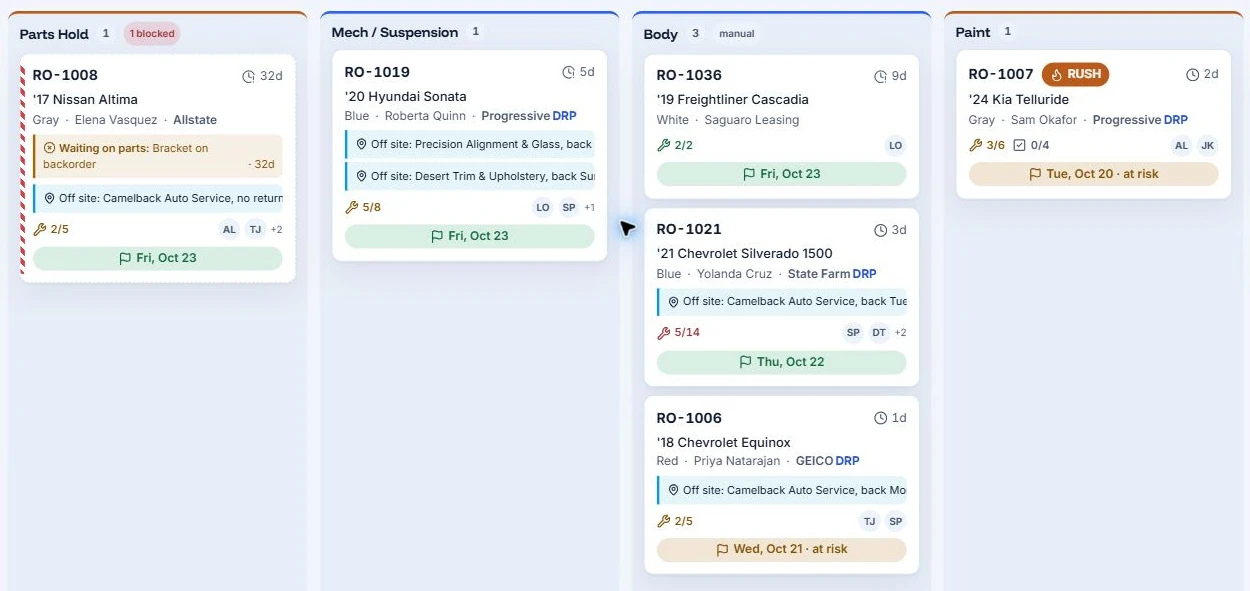
Illustrative workflow with sample shop data, not customer results.
Start with the sample board below. RO-1008 is blocked by a backordered bracket; other work is off site; RO-1007 is a rush paint job with a promise at risk. The production manager has specific issues to resolve, with the repair and assigned staff already identified.
The parts desk can follow the supplier order, the advisor can follow the off-site return, and the team can review available trade and technician hours before changing the plan. AutoHound connects the huddle to scheduling, assignments, and My Work so the next move reaches the people doing it.
Keep the money in the workflow. Follow vendor credits, unpaid insurer balances, and optional materials invoices. For a total loss, keep storage, teardown, towing, and other billable fees with the file. AutoHound helps document the amount and the next follow-up; it does not guarantee payment. See total-loss fee tracking.
Keep your estimator and QBO
Keep writing estimates in a supported CCC ONE, Mitchell, Audatex, or AdjustRite system. AutoHound's Windows connector picks up supported estimates and supplements, preserving versions on the RO.
QuickBooks Online sync then carries customers, invoices, and recorded payments into accounting on demand or on a schedule. Improve the repair workflow while retaining the estimating and bookkeeping tools your team knows.
ROME documents dealer-system and QuickBooks connections. If a dealership requires a particular DMS interface, confirm that requirement before switching. AutoHound's QBO connection is not a promise of DMS support.
Include the people doing the work
Unlimited users means your AutoHound plan can include the people who need to move the repair. Give technicians assigned work on a phone or tablet, let the parts desk follow orders and credits, and keep the advisor close to approvals and customer updates.
Internal messaging and vendor texts help keep the conversations in AutoHound. Shared-device switching identifies the person doing the work. Optional Shift Time adds staff shift records and manager-approved hours exports, separately from repair-job timers.
Start with support included
Guided setup and four included consultation hours help your team put a working plan in place. You can explore the private demo first, then decide which users, active repairs, and connections to prepare for the live shop.
ROME describes implementation and ongoing training services. AutoHound lets you start with the product in your hands and a clear view of its subscription terms, then plan the rollout with the team.
Start with a workable plan
Use the rollout to establish the next working day: who owns the active repairs, what parts are outstanding, and which interfaces must be retained.
- Keep the right connections. Confirm your supported estimator, QBO setup, and any required interfaces.
- Prepare active work. Identify open repairs, orders, balances, and documents. Agree who brings them forward and checks the totals; scope historical migration separately.
- Set up the essentials. Use the guided checklist for shop details, roles, stages, templates, the estimating connection, and capacity.
- Rehearse a handoff. Have the advisor, parts person, technician, and bookkeeper follow one repair before your chosen cutover.
Four onboarding consultation hours are included. AutoHound's team brings experience in collision repair, automotive refinish, and OEM software. See the switching plan or meet the people behind AutoHound.
Run your next huddle in AutoHound
Choose AutoHound for a production day that stays connected to the repair, the people, and the money. Keep your supported estimator and QBO, include the whole team, and start with guided setup and included consultation time. Put the next huddle in AutoHound and follow the work from there.
Open your private 7-day demo shop and explore realistic repairs without a credit card or a sales call. When you are ready to start your own shop, the 30-day live trial starts at $0 with a payment method required.
Take this to the demo
Put AutoHound to work
Explore a private sample shop and follow the estimate, the parts, the handoff, and the balance. No credit card or sales call required.
Try the 7-day demoPrefer a written checklist? Open the printable workflow scorecard.
See it in AutoHound
- Start with the repairs that are late, blocked, or at risk.
- Find the part or sublet behind a production blocker.
- Explore trade hours, technician planning, and time off.
- Open the next assignment in My Work on a phone or tablet.
- Follow customer communication and the QBO accounting handoff.
- Discuss onboarding, required interfaces, and the first live day.
Sources and product details
Published by AutoHound. Supporting documentation reviewed October 20, 2026; core competitor product pages rechecked October 31, 2026. This is our product comparison, not an independent ranking or a hands-on review of every system. AutoHound pricing and data commitments checked October 31, 2026. Product scope can change; undocumented capabilities are not treated as absent.
- ROME body shop management softwareOfficial production, parts, mobile, customer service, and accounting overview.
- ROME integrationsOfficial integration categories. Confirm the exact interface and transaction scope.
- ROME implementation and trainingOfficial implementation and continuing-training description.
- Switching to AutoHoundCurrent setup and onboarding scope.
- AutoHound public pricing and included featuresPublic monthly price, unlimited users, included features, trial and onboarding.
- AutoHound shop data commitmentsMonth-to-month terms, shop data ownership, built-in exports and no sale of shop data.
- AutoHound Privacy PolicyNo sale or advertising sharing; necessary service providers and shop-directed integrations remain distinct.
- The AutoHound teamPublished team experience and direct contact with the people building AutoHound.
Product names belong to their respective owners. This comparison does not imply affiliation or endorsement.